
Video Production Planning Guide: From Brief to Final Cut

Most videos don't fail in the edit. They fail before the camera ever rolls.
A missing shot list, a last-minute location change, a script nobody approved until shoot day; these are the things that quietly kill a video's potential. The good news? Every one of those problems is avoidable with the right plan in place.
This guide walks you through the entire video production planning process, step by step:
- How to define your goals and set a realistic budget
- Writing your script and building a storyboard
- Preparing your talent and locking in your location
- What to pack on shoot day (and what most people forget)
- Navigating legal requirements like release forms and music licensing
- Planning your distribution before you hit record
- How to do a proper pre-shoot review so nothing slips through the cracks
Our free Pre-Production Playbook from Rescue Media brings together the essentials for planning your shoot, including a project overview, a step-by-step pre-production checklist, script writing prompts, a storyboard template, a shot list template, production logistics pages, a backup planning section, a distribution timeline, and space for video production notes.
Our team at Rescue Media has produced video content for organizations across Northern Virginia, DC, Maryland, and the United States. We put this resource together because good planning is what separates a polished final cut from an expensive do-over.
Pro tip: If your project has real stakes, it’s often worth bringing in a professional team. The cost of reshoots, missed shots, or poor audio usually outweighs the upfront savings of doing everything yourself.
How to Define Your Goals and Set a Realistic Budget
Every solid video starts with two things locked in: what you want it to do and what you can spend to make it happen. Skip either one, and you're building on shaky ground.
Start with the "Why"
Before anyone touches a camera, answer these questions:
- What is this video for? (Brand awareness, lead generation, training, event recap, product demo?)
- Who is watching it? Knowing your audience shapes the tone, length, and format entirely.
- Where will it live? A LinkedIn video and a YouTube video are not the same project.
- What does success look like? Tie it to something measurable: views, conversions, sign-ups, or engagement rate.
Build a Budget That Reflects Your Goals
Your goal determines your production level. A simple internal training video has different requirements than a polished brand film. Here is a general breakdown of where the budget typically goes:
- Pre-Production: Scripting, storyboarding, location scouting, casting
- Production: Crew, equipment, talent, location fees
- Post-Production: Editing, color grading, music licensing, graphics
- Contingency: 10-15% buffer for unexpected costs
Pro tip: Reserve 10-15% of your total budget for contingencies. Something always comes up on shoot day.
If you are unsure what a realistic number looks like for your project, our local guide for video production costs for Alexandria, VA is a good place to start for rough estimates.
Writing Your Script and Building a Storyboard
This is where your creative vision takes shape on paper. And here is a truth that experienced video production teams learn early: a weak script and storyboard will cost you far more in reshoots than the time it would have taken to get it right upfront.
Write the Script First
Think of your video script as the backbone of everything that follows. Every shot, every voiceover, every motion graphic decision traces back to it. Whether you are producing corporate videos, explainer videos, or brand videos, the structure is always the same:
- Opening hook: What grabs attention in the first three seconds?
- Core message: What do you want your intended audience to walk away knowing?
- Call to action: What should they do next?
A two-column script format works well in practice. On the left: the visuals. On the right: the dialogue, voiceover, or sound effects. This makes the handoff to your camera operator and video editor far smoother.
Pro tip: Write your CTA first, then work backward. It keeps the entire scriptwriting process anchored to a result.
Then Build Your Storyboard
Your storyboard translates the script into a visual storytelling tool, scene by scene. It does not need to be artistic. Stick figures work. What matters is that every crew member looks at it and understands the plan.
Each frame should include:
- The camera angles and shot type (wide, medium, close-up)
- Audio notes (dialogue, voiceover, sound design cues)
- Transitions between scenes
- Any special effects, motion graphics, or text overlays
This is also the right time to build your shot list so that shoot days stay organized and on schedule.
Preparing Your Talent and Locking In Your Location
Two things that look simple on paper but cause the most chaos on set: who is on camera and where you are filming.
Getting the Right People Ready
Getting the right people prepared is as important as finding them. Whether you are working with internal staff, a voiceover artist, or hired talent, the pre-production phase is when you lock in the following:
- Wardrobe guidelines: Solid colors work best on camera. Avoid tight patterns and stripes. Mic-friendly clothing (with a collar or lapel) saves everyone time.
- Talking points or scripts: Share these well before shoot day, not the morning of.
- Release forms: Every person appearing in your final video needs to sign one. No exceptions.
- Rehearsals or prep calls: Even a 15-minute Zoom conversation beforehand helps talent feel comfortable on camera, which directly improves audio quality and on-screen energy.
Location Scouting: More Than Just Aesthetics
A beautiful location that is loud, inaccessible, or poorly lit will cost you. Good location scouting means evaluating a space across three dimensions:
- Visual: Does it match the creative brief? Check natural light direction and consistency
- Audio: Listen for background noise, traffic, HVAC systems, and echo
- Logistical: Confirm parking, power access, permits, restrooms, and space for equipment
Visit the location at the same time of day as your shoot. Lighting at 9 am looks completely different at 2 pm. Also, check whether a filming permit is required. Public spaces in the DC and Northern Virginia area, for example, often require permits even for small crews.
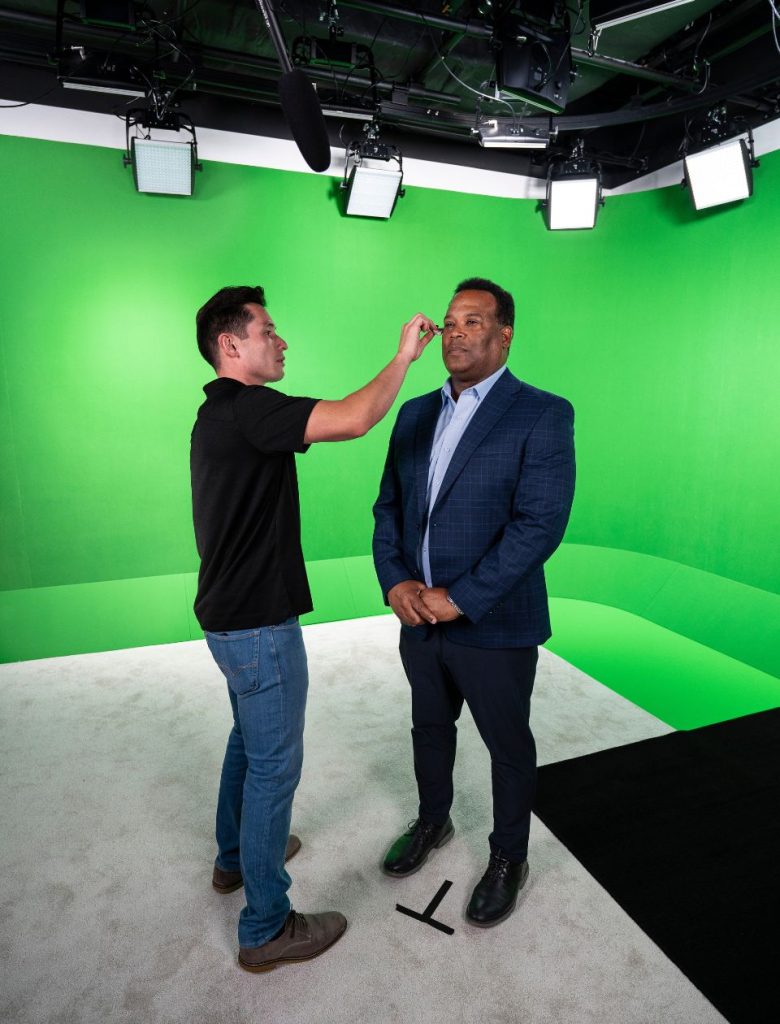
If you are looking for a controlled environment without location surprises, shooting in a professional studio is the cleanest solution. Rescue Media's Alexandria studio gives you a dedicated soundstage with full production infrastructure, so background noise and lighting variables are out of the equation before you even unpack your gear.
What to Pack on Shoot Day (and What Most People Forget)
Showing up to a shoot missing a critical piece of video equipment is not a minor inconvenience. It can derail an entire production day, especially when you have crew members, talent, and a location all on the clock.
The Core Gear List
Here is what every shoot day requires as a solid foundation:
Camera and Visual:
- Primary camera body, plus a backup if available
- Lenses for different shot types (wide, standard, telephoto)
- Tripod, gimbal, or stabilizer
- Lighting kits (key, fill, and backlight at minimum)
- Extra batteries, chargers, and memory cards
Audio Equipment:
- Lavalier microphones (clip-on) for interview setups
- Boom microphone for wider shots
- Audio recorder or mixer
- Monitoring headphones for sound recording on set
Set Essentials:
- Shot list, script, and call sheet (printed and digital)
- Gaff tape, extension cords, and power strips
- Teleprompter if needed
- Signed release forms
- First aid kit
What Most People Forget
Here is where experienced video production teams pull ahead:
- Backup memory cards. Cards fail. Bring more than you think you need.
- An audio monitoring setup. Bad audio quality is one of the top reasons raw footage gets rejected in post. Someone needs to be listening in real time.
- A neutral density (ND) filter for outdoor shoots in bright conditions.
- More b-roll than feels necessary. A good rule of thumb from any seasoned video production team: capture at least three times more b-roll than you think the video editor will need. Editors love options.
Pro tip: Do a full gear check the day before the shoot, not the morning of. Format your memory cards, charge your batteries, and test every port. On-set troubleshooting burns time that should be going toward capturing great content.
A production assistant on shoot day makes a real difference here. Having one person dedicated to checklists, logistics, and setup frees up the camera operator and director to focus on the creative work.
Legal Requirements, Like Release Forms and Music Licensing
This section does not get enough attention in most video production planning guides. And it should, because skipping it can get a finished project shelved entirely.
Talent and Location Release Forms
Anyone appearing in your final video may need to sign a talent release form before the cameras roll. This gives you the legal right to use their likeness in your content. The same applies to any private property you are filming on. A location release from the property owner protects you from disputes after the fact. Do not assume a verbal agreement is enough. Get it in writing and have a signed copy before shoot day begins.
Music Licensing: The Part Everyone Gets Wrong
Using a popular song in your video without proper licensing can get your content removed, demonetized, or flagged across social media platforms. Even a few seconds of background music counts.
For most video projects, you will need two things:
- A synchronization (sync) license: Permission to pair a musical composition with your visual content
- A master use license: Permission to use the specific recording of that song
The simplest way to avoid this entirely is to use royalty-free music from platforms like Artlist, Epidemic Sound, or Musicbed. These libraries give you pre-cleared tracks at a flat annual rate, which is far easier to manage across a high-volume, effective video creation workflow.
If you are posting to YouTube, Facebook, or Instagram, those platforms have their own licensed music libraries you can use within their native editors at no extra cost. But if the video lives on your website or in email campaigns, you will need your own license.
Other Legal Considerations
- Filming permits for public locations
- Equipment insurance and general production liability coverage
- Stock footage usage rights, if you plan to incorporate third-party clips in post-production
Planning Your Distribution Before You Hit Record
This is the step most people treat as an afterthought. It should be one of the first things you decide. The purpose of your video determines everything: how long it should be, what aspect ratio to shoot in, what tone to use, and what your CTA should be. And all of that is determined by where it is going.
Platform Shapes Format
Different social media platforms and video platforms have completely different requirements. Here is a quick reference:
- YouTube: 16:9 horizontal, ideal length 5-15 minutes for long-form content
- Instagram Reels / TikTok: 9:16 vertical, ideal length 15-60 seconds
- LinkedIn: 16:9 or 1:1 square, ideal length 1-2 minutes
- Website / Landing Pages: 16:9 horizontal, ideal length 60-90 seconds
- Email Campaigns: Thumbnail with link, keep it under 2 minutes
The practical implication of this during production: if you know a video is going on Instagram and LinkedIn, you need to shoot with both aspect ratios in mind. That means framing your shots to leave room to crop vertically without losing the key subject. It is a creative decision that has to be made before you start filming, not in the editing bay.
Plan for Repurposing From Day One
A single shoot day can generate enough raw footage for multiple short videos, a customer testimonial clip, social media cuts, and even a podcast-style audio edit. But only if the production schedule and shot list were built with that in mind.
Our team at Rescue Media routinely help clients think through this workflow during the pre-production phase, so one day of filming translates into a full content library instead of a single deliverable.
How to Do a Proper Pre-Shoot Review
The final step of the entire pre-production phase is one that people often skip when time gets tight. That is usually when something goes wrong on set.
A proper pre-shoot review is not a casual glance at your notes. It is a structured walkthrough of every element that needs to be in place before cameras roll.
Complete Your Video Production Planning Checklist
Run through these final steps at least 24 to 48 hours before your shoot:
- Call sheet sent to all crew members and talent, with arrival times, location details, and parking instructions
- Location confirmed and access arranged (including any permits)
- Gear packed and tested, with backups ready
- Scripts and shot lists finalized and distributed to the full video production team
- Release forms collected and stored
- Music and stock footage licensed and cleared
- Production schedule finalized with buffer time built in
Do a Final Run of Show
Walk through the shoot day sequence with your team. Who is arriving when? Who handles setup? When does talent arrive? What is the shooting order? What is the backup plan if something falls through?
This is the part where good planning becomes great video. The production stage runs smoother, the post-production process is cleaner, and the final product reflects all the hard work that went into preparing for it.
Pro tip: Complete your checklist at least a week in advance. Then review it again 24 hours before the shoot. That buffer is what turns careful planning into a polished final cut.
If you want a complete, ready-to-use version of this checklist alongside script templates, a storyboard grid, and a shot list format, download the free Pre-Production Playbook. It covers the entire process from concept development to shoot day.
And if you are working on a project where the stakes are high and you need a professional video production company with years of experience behind it, our team at Rescue Media is based in Alexandria, VA, and works with organizations of all sizes across the DC metro area and nationwide.
Frequently Asked Questions
What is the most important step in video pre-production?
Defining your goals clearly. Every other decision, from your video type and budget to your script and distribution plan, flows from knowing exactly what the video needs to accomplish and who it is for.
How long does video production planning take?
For most marketing videos, pre-production takes two to four weeks. More complex projects with multiple locations, large crews, or custom motion graphics can take six to eight weeks. Rushing this phase is one of the most common reasons productions go over budget.
Do I need a professional video production company, or can I make my own video?
It depends on the use case and the stakes involved. Short social media clips can be produced in-house effectively. But for high-quality video content meant to increase brand awareness, drive conversions, or represent your organization to potential customers, professional production consistently delivers a better return on investment.
What should every video production planning checklist include?
At minimum: defined goals, a confirmed budget, a completed script and storyboard, a shot list, signed talent release forms, a licensed music plan, confirmed location with permits, a full gear list, and a production schedule sent to all crew members and talent before shoot day.
From First Brief to Final Cut, Make It Count With Rescue Media
Good video pre-production is the difference between a project that looks professional and one that performs. This complete guide has walked you through the entire video production process, from setting goals to locking your distribution plan before a single camera rolls.
Here are the key takeaways to take with you:
- Define your goals and your target audience before anything else
- Build your budget around your video type, not the other way around
- Scriptwriting and storyboarding are not optional steps in the pre-production planning phase
- Location scouting covers visuals, audio quality, and logistics equally
- Packing the right video equipment includes backups for everything critical
- Clear audio matters as much as clear video. Do not overlook sound engineers and audio mixing
- Release forms and music licensing must be handled before the rough cut
- Distribution planning shapes every creative decision from shoot day forward
- A structured pre-shoot review is what separates smooth productions from expensive ones
When you are ready to move from planning your own video to working with a team that has done this across every industry and video type, Rescue Media is headquartered in Alexandria, VA, and brings full-service production capabilities to organizations across the DC metro area and nationwide. From studio rental to post-production, including color correction, visual effects, and audio mixing, every step is handled in-house.
LET'S MAKE AN IMPACT
.svg)